Automatic Folders
The settings dialog has an Automatic Folders section; here you may define custom folders where downloads can be automatically directed based on user-defined rules.
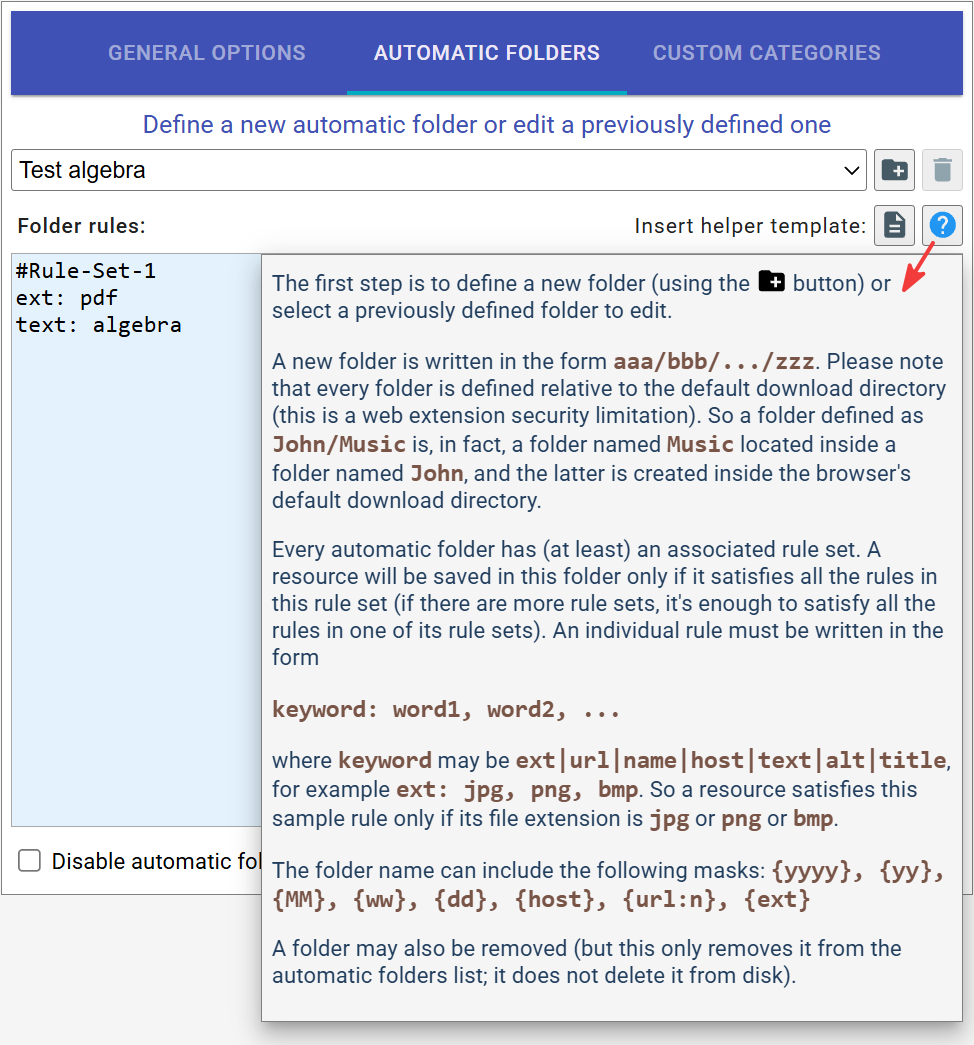
Every automatic folder has (at least) an associated rule set. A resource will be saved in this folder only if it satisfies all the rules in the rule set. A rule must be written in the form
keyword: word1, word2, ...
where
keyword may be
all|ext|url|name|host|text|alt|title, for example
ext: jpg, png, bmp. So a resource satisfies this sample rule only if its file extension is
jpg or
png or
bmp.
In this dialog, you may define new folders or select previously defined folders for editing. A new folder is written in
the
form
aaa/bbb/.../zzz. Please note that every folder is defined relative to the default download directory
(this is a browser extension security
limitation). So a folder defined as
John/Music is, in fact, a folder named
Music located inside a folder named
John, and the latter is created inside the default download directory.
A folder can be removed. This only removes it from the automatic folders list; it does not delete it from disk.
Additional Automatic Folders tips:
-
A rule may also be specified as
keyword_1, keyword_2, ...: word1, word2, .... This type of rule is satisfied if the value associated withkeyword_1( OR the value associated withkeyword_2) contains at least one word from the listword1, word2, .... -
all: word1, word2, ...is a shortcut forext, url, name, host, text, alt, title: word1, word2... -
In the case of conflicting folders, the item's edit button is displayed in a warning color. The directory field in the edit popup has a dropdown arrow, allowing you to choose between these folders. If no directory is chosen, the default download directory will be used.